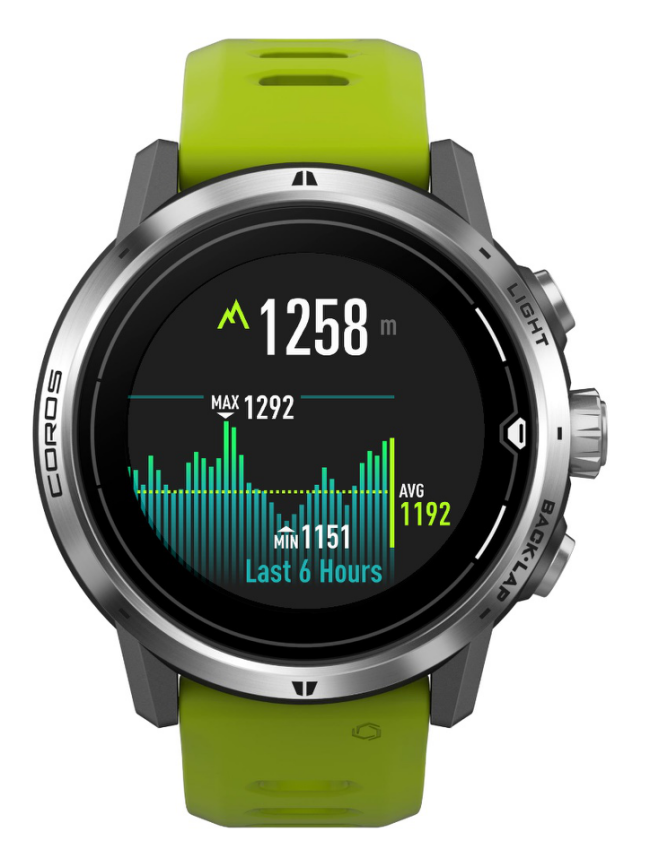
You can easily access widgets from the main watch face by scrolling up and down. Press the CONFIRM button on certain widget pages for additional information.
NOTE: you can’t open the main menu from widget pages. Return to the main watch face first.
This widget displays the following info.
- Last updated elevation in meter (metric) or foot (imperial).
- Change the unit on your COROS watch – main watch face > System > More Settings > Units > Imperial | Metric.
- Maximum, minimum and average elevation in the last 6 hours.
- Elevation graph in the last 6 hours.
- Press the CONFIRM button and scroll to view the elevation data in the last 24 hours. Swipe left and right to view on COROS PACE 3/PACE Pro/COROS NOMAD/APEX Pro/APEX 2/APEX 2 Pro/VERTIX/VERTIX 2/VERTIX 2S.
- Elevation is recorded every 10 minutes in daily use and every 5 seconds in workouts.
- Press and hold Digital Dial to calibrate the elevation.
- Use GPS
- Enter Elevation