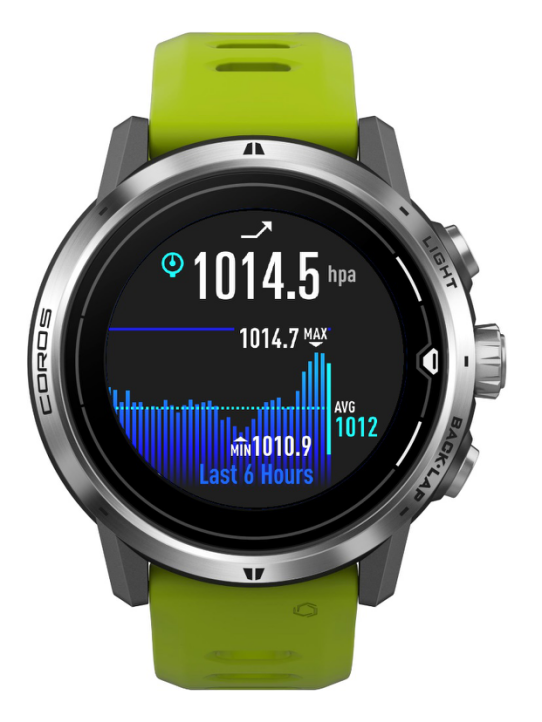
You can easily access widgets from the main watch face by scrolling up and down. Press the CONFIRM button on certain widget pages for additional information.
NOTE: you can’t open the main menu from widget pages. Return to the main watch face first.
This widget displays the following info.
- Last updated barometric/atmospheric reading in hPa (Hectopascal Pressure) or mmHg.
- Maximum, minimum, and average barometric/atmospheric reading in the last 6 hours.
- Barometric/atmospheric graph in the last 6/12/18 hours.
- Press the CONFIRM button and scroll to view the barometric/atmospheric data in the last 24/48/72 hours. Swipe left and right to view on COROS PACE 2/PACE 3/PACE Pro/COROS NOMAD/APEX Pro/APEX 2/APEX 2 Pro/VERTIX/VERTIX 2/VERTIX 2S.
- Change the history data display range – main watch face → System → Sensors → Barometer → Schedule → Last 6 | 12 | 18 Hours.
- Switch between Sea-level Pressure/Station Pressure.
- Main watch face → System → Sensors → Barometer → Data Source → Station Pressure | Sea-level Pressure.
- Station pressure is measured at a station without any altitude adjustment like from a house or the top of a mountain. It will change at various altitudes.
- Sea-level pressure is the station pressure adjusted to the sea level. It is often used for predicting weather changes at the current altitudes.
- Provides weather forecast using the arrow displayed on the top of the page.
- Arrow pointing downwards indicates potential stormy weather.
- Arrow pointing upwards indicates potential clear weather.
- The arrow consists of 2 parts. The left part shows the info 3-6 hours ago and the right part shows the last 3 hours.
- Press the CONFIRM button and scroll to view the barometric/atmospheric data in the last 24/48/72 hours. Swipe left and right to view on COROS PACE 2/PACE 3/PACE Pro/COROS NOMAD/APEX Pro/APEX 2/APEX 2 Pro/VERTIX/VERTIX 2/VERTIX 2S.
- Barometric/atmospheric data is recorded every 10 minutes. Air conditioner and heater can impact the accuracy of barometric readings.
- Press and hold the Digital Dial to access quick settings.
- Data Source
- Display Range
- Pressure Units
- Storm Alert
- (i) Baro. Direction